> For the complete documentation index, see [llms.txt](https://docs.cwallet.com/llms.txt). Markdown versions of documentation pages are available by appending `.md` to page URLs; this page is available as [Markdown](https://docs.cwallet.com/cwallet-tools/giveaway/how-to-verify-custom-app-actions-with-callback-verification.md).
# How to Verify Custom App Actions with Callback Verification
Utilize callback verification to automatically verify whether users have taken any actions within the app. Participants who have performed the actions are eligible to complete this task.
Utilize callback verification to automatically verify whether users have taken any actions within the app. Participants who have performed the actions are eligible to complete this task. All types of tasks can be verified!
**Follow the steps to enable the callback verification:**
**Step 1**
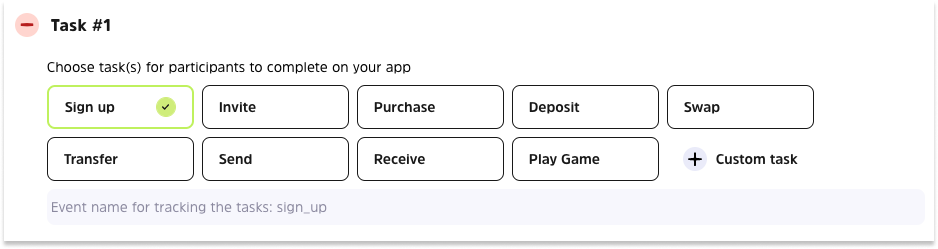
Choose or customize action tasks that users need to complete on the app.
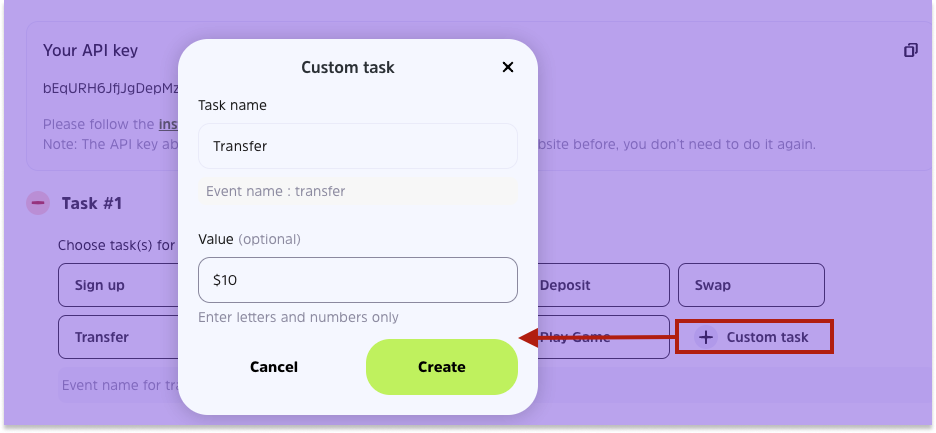
**To custom a task:**
Select custom task, customize the task name, it is optional to specify the number of times/value, etc. Click **Create** to save your changes
**Step 2**
Input the name of your app, the download URLs for the Apple App Store and Google Play Store, and the Android APK URL.
**Step 3**
After that, you will need to obtain deep link params (something like track\_id=4wmmHtD4rSA) from your app and parse out the trackId.
**About track\_id:**
* TrackId is necessary to detect the user's participation in the task and to verify it. We will detect when a user clicks to participate in the task, the ?trackId={{trackId}} will be used for detection.
* You will see the ?trackId={{trackId}}\&send={{send}} applied to your app deep link:
If your app deep link is
the users may open your app via the link
**Step 4**
Next, please copy the API key we provide you to integrate it with your app.
Then enter the parameters according to the rules of const data, and encrypt the whole const data using the standard **HmacSHA256** algorithm.
**Step 5**
Use our official API below and pass the corresponding parameters in the following code.
**Official API:**
```javascript
const { track_id, send } = queryString.parse(deepLink.search); //your deepLink params
const event = "send";
const remark = "remark"; // optional
const data = `track_id=${track_id}&event=${send}&remark=${remark}`; // optional
const sign = crypto.HmacSHA256(data, api_key).toString(); // HmacSHA256
fetch("https://cwallet.com/public/v1/giveaway/task/callback", {
method: "POST",
headers: {
"Content-Type": "application/json",
},
body: JSON.stringify({
track_id,
sign,
event,
remark,
}),
}).then(async (res) => {
console.log(await res.json());
});
```
**Step 6**
After the above steps are completed, enter your url-scheme and click the ‘Check API callback’ to test it.
**Note:**
Each project you created on Cwallet Giveaway Tool will have a unique API key, and it will not change. Additionally, each app must be integrated separately.
.png)
.png)
.png)
.png)
.png)
.png)
.png)