> For the complete documentation index, see [llms.txt](https://docs.cwallet.com/llms.txt). Markdown versions of documentation pages are available by appending `.md` to page URLs; this page is available as [Markdown](https://docs.cwallet.com/cwallet-tools/giveaway/how-to-verify-the-user-player-vip-level-requirement-on-your-website-with-callback-verification.md).
# How to Verify the User/Player/VIP Level Requirement on Your Website with Callback Verification
It helps you filter qualified participants and encourage users to reach the level you require for your website.
**How the task works**
With this Level Requirement task, you can create giveaways only available for eligible users who meet the level requirements, and participants who don’t meet this requirement will not be able to join this giveaway. It helps you filter qualified participants and encourage users to reach the level you require for your website.
**Please follow the steps to set up the task and to integrate API callback.**
**Step 1**
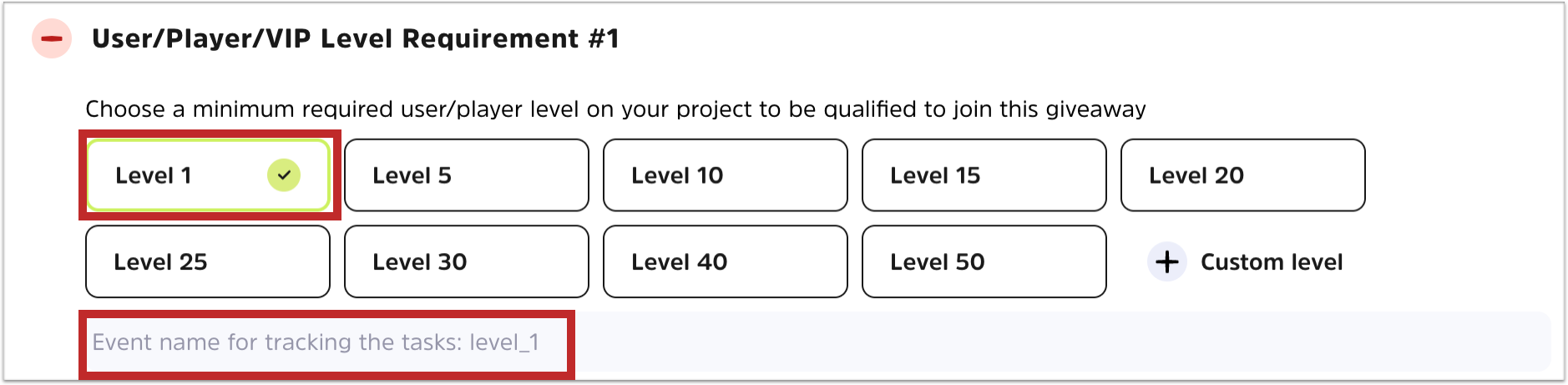
Choose a level type as the requirement for level verification on your website:
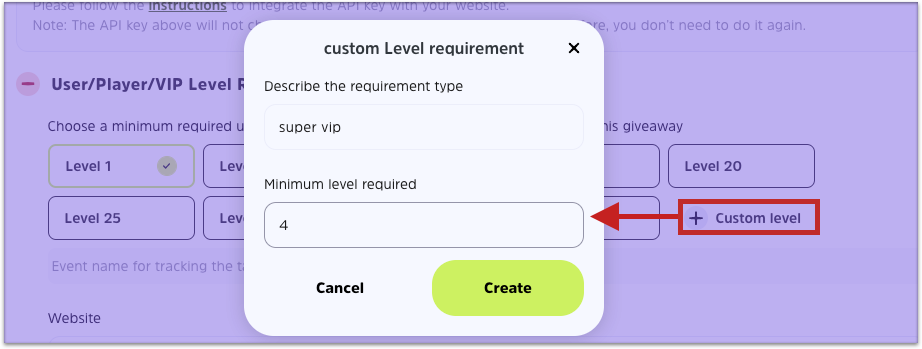
**To custom level requirement:**
You can customize the level name and relevant requirement based on the design of your website:
E.g. You can add a level type: super vip 4
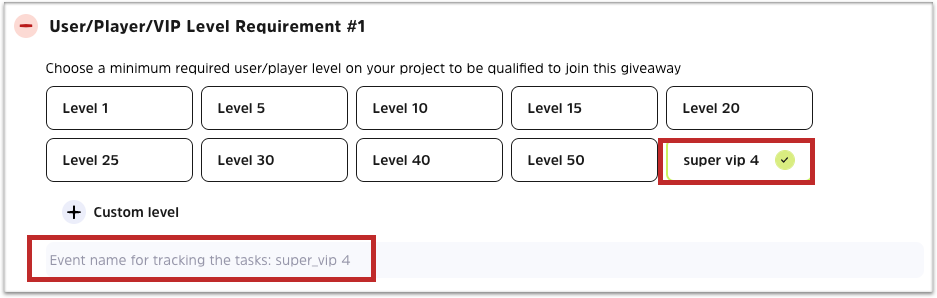
Your custom level will appear as follows:
**Step 2**
After that, you will need to obtain URL search params (track\_id=MikHklwcY\&leve1=true) from your website and parse out the trackId.
**About TrackId:**
* TrackId is necessary to detect the user's participation in the task and to verify it. We will detect when a user clicks to participate in the task, the ?trackId={{trackId}} will be used for detection.
* You will see the ?trackId={{trackId}}\&level1=true applied to your website link:
If your website link is
the visitors may come to your site via the link
**Step 3**
Next, please copy the API key we provide you to integrate it with your website.
Then enter the parameters according to the rules of const data, and encrypt the whole const data using the standard **HmacSHA256 algorithm.**
**Step 4**
Use our official API below and pass the corresponding parameters in the following code.
**official API:**
```javascript
// const api_key =
"3lhpTSAJd6XDgBe4XWcozob4iMmYUlkPc9c4fwnoydGk4Bh5lSA3qrSiqgXeJcX7"; // your api_key
const event = “level1” //your chose level
const { track_id} = queryString.parse(window.location.search); // url search
const remark = "remark"; // optional
const data = `track_id=${track_id}&event=${event}&remark=${remark}`; // optional
const sign = crypto.HmacSHA256(data, api_key).toString(); // HmacSHA256
fetch("https://cwallet.com/public/v1/giveaway/task/callback", {
method: "POST",
headers: {
"Content-Type": "application/json",
},
body: JSON.stringify({
track_id,
sign,
event,
remark,
}),
}).then(async (res) => {
console.log(await res.json());
});
```
**Step 5**
Enter your website address and click '**Check API callback**' to test if the integration is successful and task is verifiable.
**Note**:
Each project you created on Cwallet Giveaway Tool will have a unique API key, and it will not change. So you only need to integrate once for a website. Also, you will be able to create tasks on multiple websites if you need to.
.png)
.png)
.png)

.png)
