> For the complete documentation index, see [llms.txt](https://docs.cwallet.com/llms.txt). Markdown versions of documentation pages are available by appending `.md` to page URLs; this page is available as [Markdown](https://docs.cwallet.com/cwallet-tools/lucky-box/revolutionizing-telegram-payments-unlocking-the-untapped-potential-of-lucky-box-gift-and-pay.md).
# Revolutionizing Telegram Payments: Unlocking the Untapped Potential of Lucky Box - Gift and Pay
**Introducing Lucky Box: Scenarios, Benefits, and How to Create**
Are you ready to add an element of excitement and surprise to your Telegram experience? Lucky Box is here to bring joy and rewards to your digital interactions and even transactions. Let's dive into what Lucky Box is, how it works, and the scenarios and benefits it offers.
**What is Lucky Box?**
Lucky Box is an innovative feature that allows you to send and receive digital gifts in the form of surprises and rewards through Telegram. It adds a fun and interactive element to your conversations, making them more engaging and enjoyable.
**How to Create a Lucky Box**
Creating a Lucky Box is simple and straightforward:
1. **Start Chatting with Cwallet Bot:** Begin by chatting with the Cwallet Bot on Telegram. You can find it by searching for @cctip\_bot and clicking "Start" to initiate the conversation.
2. **Enter Lucky Box:** Once you've started the chat, select "Lucky Box" to begin creating your digital surprise.
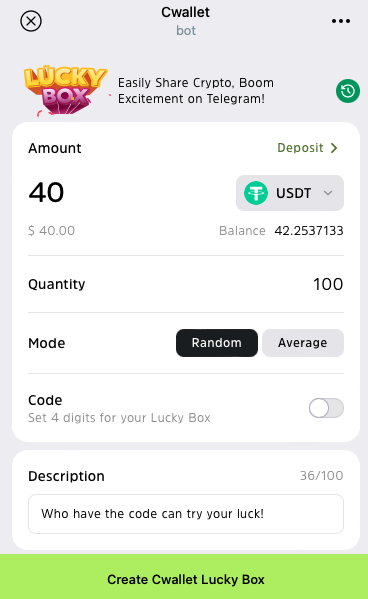
3. **Customize Your Lucky Box:** Fill in the required information, including the token, amount, quantity (number of winners), mode, entry code (optional), and description. Click "Create Cwallet Lucky Box" to create your Lucky Box.
4. **Share the Excitement:** After creating your Lucky Box, confirm your settings and share the Lucky Box link with your friends, colleagues, or groups on Telegram. You can also share it on Telegram or other social media platforms like Twitter and Facebook to spread the word.
**How to Participate and Claim Rewards**
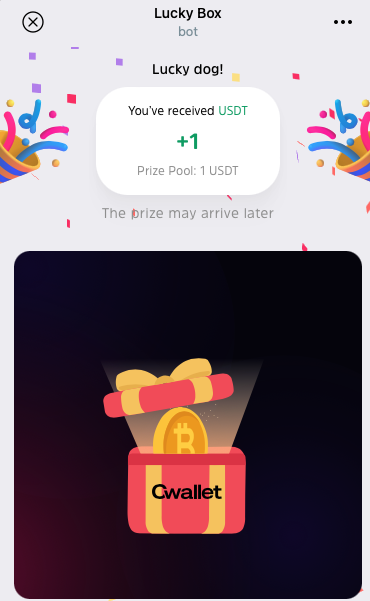
1. **Claim** **Rewards**: Once you've created a Lucky Box and shared it with your friends, they can easily claim their rewards by clicking into your link and click **Tap** **to** **Claim** button to claim rewards.
2. **Check Rewards:** Users can log in to [Cwallet](https://cwallet.com) using their Telegram account to view and claim their rewards. Alternatively, they can check their balance and perform various fund operations such as tipping, airdrops, deposits, withdrawals, and more directly within the [@cctip\_bot.](https://t.me/cctip_bot)
With these options, claiming rewards from Lucky Box is quick and hassle-free, ensuring everyone can enjoy the benefits of their digital surprises.
**Scenarios and Benefits of Lucky Box**
Lucky Box offers a variety of scenarios and benefits for users:
* **Festive Celebrations:** Send Lucky Boxes to friends and family during holidays and special occasions to spread joy and celebrate together.
* **Social Gatherings:** Enhance the atmosphere of gatherings and parties by sending Lucky Boxes to participants, adding an element of surprise and fun to the event.
* **Business Promotions:** Businesses can use Lucky Boxes to engage customers during promotions or events, offering discounts or special rewards to attract participation.
* **Interactive Games:** Engage in interactive games and activities with friends or groups on Telegram, using Lucky Boxes to add excitement and anticipation to the experience.
**In Conclusion**
Lucky Box is more than just a digital gift—it's a way to bring people together, foster connections, and create memorable experiences. With its easy-to-use interface and customizable features, Lucky Box offers endless possibilities for fun and rewards on Telegram. Try it out today and unleash the joy of surprises with Lucky Box!
🎁 [Click to try your luck](https://t.me/cctip_bot/luckyBox?startapp=1789973642734759936) in this Lucky Box
Create your [First Lucky Box](https://t.me/cctip_bot) Now!