# HR Management Overview

**Getting Started with HR Management**

1. Log in to [Cwallet](https://cwallet.com/), navigate to **Tools**, and click **HR Management** to begin your crypto payroll setup.

<figure><img src="https://3234817847-files.gitbook.io/~/files/v0/b/gitbook-x-prod.appspot.com/o/spaces%2FLIfMHqDEB5rVHERvbUyz%2Fuploads%2FrlEQgHYZn9LlHZ6ZlW5V%2Fimage.png?alt=media&#x26;token=93f1b26e-7307-4f27-be34-0627a315429c" alt=""><figcaption></figcaption></figure>

2. For security purposes, you’ll need to:

* Set an **additional HR password**.
* Enter your **company name**.
* Enable a **dedicated 2FA** for the HR system (note: this is separate from your main Cwallet account 2FA).

<figure><img src="https://3234817847-files.gitbook.io/~/files/v0/b/gitbook-x-prod.appspot.com/o/spaces%2FLIfMHqDEB5rVHERvbUyz%2Fuploads%2FUA9W4fcAxCBOhY6o7kHJ%2Fimage.png?alt=media&#x26;token=6f36cbb6-59b7-419c-95b3-28fb48ae9f69" alt=""><figcaption></figcaption></figure>

<figure><img src="https://3234817847-files.gitbook.io/~/files/v0/b/gitbook-x-prod.appspot.com/o/spaces%2FLIfMHqDEB5rVHERvbUyz%2Fuploads%2FmVFK7LUbvUtQh5dbRy5B%2F20250627-101809.jpeg?alt=media&#x26;token=5042393d-5395-455f-b371-6c7fedae38bc" alt=""><figcaption></figcaption></figure>

<figure><img src="https://3234817847-files.gitbook.io/~/files/v0/b/gitbook-x-prod.appspot.com/o/spaces%2FLIfMHqDEB5rVHERvbUyz%2Fuploads%2FIE7fD7eLJQtKquGCFmuW%2Fimage.png?alt=media&#x26;token=040b4d5c-3136-4877-8292-245faf5cf4f5" alt=""><figcaption></figcaption></figure>

3. Once completed, you can start configuring your company settings.

**Initial Setup Steps**

* You will be provided with a **company secret key**, which can be used to restore your HR data.

<mark style="color:red;">**Note:**</mark> Please download and store it securely. Do not share it with anyone.

<figure><img src="https://3234817847-files.gitbook.io/~/files/v0/b/gitbook-x-prod.appspot.com/o/spaces%2FLIfMHqDEB5rVHERvbUyz%2Fuploads%2FjZ1oXKiLRQlwoxNjne5b%2Fimage.png?alt=media&#x26;token=d8e6731a-b7a4-4d9d-bcea-f966b5dcd2f5" alt=""><figcaption></figcaption></figure>

* Select a **payroll flow** — choose a predefined option or create a custom flow.

<figure><img src="https://3234817847-files.gitbook.io/~/files/v0/b/gitbook-x-prod.appspot.com/o/spaces%2FLIfMHqDEB5rVHERvbUyz%2Fuploads%2FetlW0OybA2zuXUWXESFm%2Fimage.png?alt=media&#x26;token=be385246-97f9-43fc-aab3-9edc7e9adaf4" alt=""><figcaption></figcaption></figure>

* Set your company's **probation policies**, including: Probation duration and Salary ratio for probationary employees.

<figure><img src="https://3234817847-files.gitbook.io/~/files/v0/b/gitbook-x-prod.appspot.com/o/spaces%2FLIfMHqDEB5rVHERvbUyz%2Fuploads%2Fih3HIMOdXFxAqZaYuZlx%2Fimage.png?alt=media&#x26;token=5dd9d2a4-670f-48e3-9c37-335315b46310" alt=""><figcaption></figcaption></figure>

* In the final setup step, you can **add employee information** right away or skip this step and do it later.

<figure><img src="https://3234817847-files.gitbook.io/~/files/v0/b/gitbook-x-prod.appspot.com/o/spaces%2FLIfMHqDEB5rVHERvbUyz%2Fuploads%2FPKjNKYj6CLQuVCBOAca2%2Fimage.png?alt=media&#x26;token=9f792a9d-2eb0-433a-a078-4049689900d4" alt=""><figcaption></figcaption></figure>

## **How to add employee?**

Manage all employee-related information in one place:

* Add employees **one by one** or via **batch import**.
* Maintain data including job title, compensation, department, employment status, and team structure.

<figure><img src="https://3234817847-files.gitbook.io/~/files/v0/b/gitbook-x-prod.appspot.com/o/spaces%2FLIfMHqDEB5rVHERvbUyz%2Fuploads%2Fp1goeZeXJt0shAJMb9f7%2Fimage.png?alt=media&#x26;token=8be538b8-d0f1-411a-88f2-62260353b2f4" alt=""><figcaption></figcaption></figure>

<figure><img src="https://3234817847-files.gitbook.io/~/files/v0/b/gitbook-x-prod.appspot.com/o/spaces%2FLIfMHqDEB5rVHERvbUyz%2Fuploads%2FqcmEUJe0VGaePuoIIMlp%2Fimage.png?alt=media&#x26;token=978ad3a8-b81b-46eb-8f02-fc66d8ea52c8" alt=""><figcaption></figcaption></figure>

**Add One by One**

* Manually enter employee details.
* Fields marked with \* are mandatory.

<figure><img src="https://3234817847-files.gitbook.io/~/files/v0/b/gitbook-x-prod.appspot.com/o/spaces%2FLIfMHqDEB5rVHERvbUyz%2Fuploads%2FkT3g9Ds5iDS8WLtTJewQ%2Fimage.png?alt=media&#x26;token=cd2643dd-c138-48bf-b54f-811e65f93987" alt=""><figcaption></figcaption></figure>

**Batch Add**

* Download the template, fill it in, and upload it.
* System will auto-read and match fields (you can adjust field mapping if needed).

<figure><img src="https://3234817847-files.gitbook.io/~/files/v0/b/gitbook-x-prod.appspot.com/o/spaces%2FLIfMHqDEB5rVHERvbUyz%2Fuploads%2F4xQo4gQBYjLkbpZoeFTA%2Fimage.png?alt=media&#x26;token=0c35a532-a130-4943-b1f0-fcd409bde425" alt=""><figcaption></figcaption></figure>

<figure><img src="https://3234817847-files.gitbook.io/~/files/v0/b/gitbook-x-prod.appspot.com/o/spaces%2FLIfMHqDEB5rVHERvbUyz%2Fuploads%2FvBBw2kWwhmaNAIyBbUyQ%2Fimage.png?alt=media&#x26;token=082c8d7f-8d46-4306-a186-fd8e8c53a876" alt=""><figcaption></figcaption></figure>

* If the system shows your document has an error, you can download the file and check the error details.

<figure><img src="https://3234817847-files.gitbook.io/~/files/v0/b/gitbook-x-prod.appspot.com/o/spaces%2FLIfMHqDEB5rVHERvbUyz%2Fuploads%2F320WAtyi84sbobL2vdof%2Fimage.png?alt=media&#x26;token=a14e5f41-fcec-4210-8db5-68c74f649c82" alt=""><figcaption></figcaption></figure>

* And after your document has been uploaded successfully,  your employee data will be shown in your company details.

<figure><img src="https://3234817847-files.gitbook.io/~/files/v0/b/gitbook-x-prod.appspot.com/o/spaces%2FLIfMHqDEB5rVHERvbUyz%2Fuploads%2FnzT5wbiSuJ9tY4plXbRW%2Fimage.png?alt=media&#x26;token=18f96adc-2fe1-4c00-b855-3c676ded3fcd" alt=""><figcaption></figcaption></figure>

<figure><img src="https://3234817847-files.gitbook.io/~/files/v0/b/gitbook-x-prod.appspot.com/o/spaces%2FLIfMHqDEB5rVHERvbUyz%2Fuploads%2FZanNbpU0Jt2qk8ohyZIS%2Fimage.png?alt=media&#x26;token=994e5dc7-2edb-46c9-81e8-cf6fc4f00092" alt=""><figcaption></figcaption></figure>

## **Role Permission**

Start by setting **role-based permissions** for your team.\
This controls what each role (e.g. HR, manager, payroll admin) can access and perform within the system.

<mark style="color:red;">**Note:**</mark> Roles will be automatically generated based on your payroll configuration.

* You can **add new roles**, **add administrators**, assign **sub-roles**, and **customize permissions** for each role.

<figure><img src="https://3234817847-files.gitbook.io/~/files/v0/b/gitbook-x-prod.appspot.com/o/spaces%2FLIfMHqDEB5rVHERvbUyz%2Fuploads%2FGn7CZlbUFkYVHes5l0eZ%2Fimage.png?alt=media&#x26;token=430643b6-0711-4c46-bd47-d1ebacf268ab" alt=""><figcaption></figcaption></figure>

<figure><img src="https://3234817847-files.gitbook.io/~/files/v0/b/gitbook-x-prod.appspot.com/o/spaces%2FLIfMHqDEB5rVHERvbUyz%2Fuploads%2F2NqpmHnhtVMZmDKWdw9K%2Fimage.png?alt=media&#x26;token=fe847551-b262-47d5-b70c-cf56eb7fdec5" alt=""><figcaption></figcaption></figure>

<figure><img src="https://3234817847-files.gitbook.io/~/files/v0/b/gitbook-x-prod.appspot.com/o/spaces%2FLIfMHqDEB5rVHERvbUyz%2Fuploads%2FTXwOBneCGUSJadUWbR5o%2Fimage.png?alt=media&#x26;token=20348682-42f1-485d-8d2d-a856c4c2773f" alt=""><figcaption></figcaption></figure>

## **Salary Record**

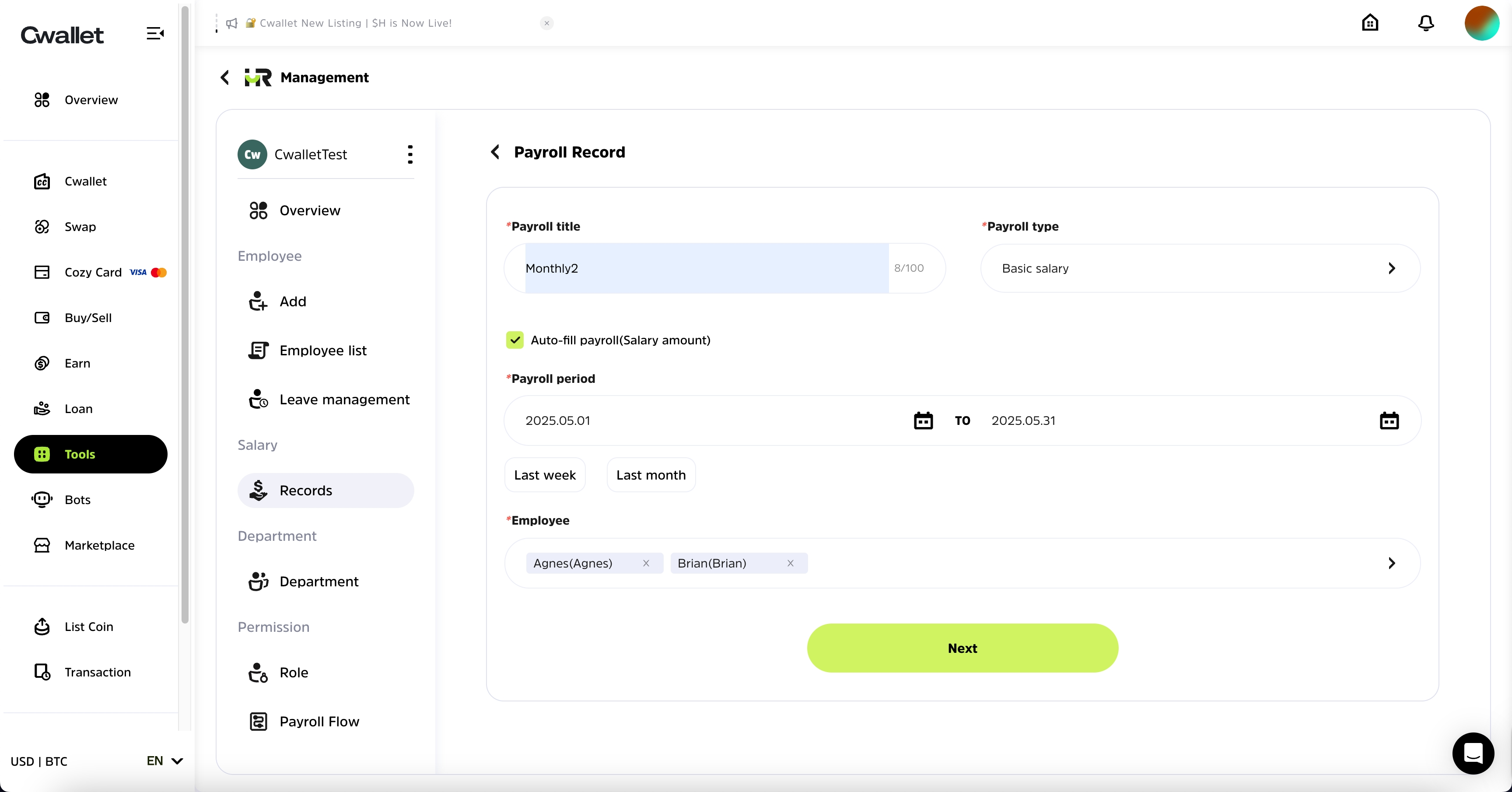
Cwallet automates salary calculations based on:

* The employee's **salary cycle**
* Their current **employment status** (Contract, Probation, Resigned)

<figure><img src="https://3234817847-files.gitbook.io/~/files/v0/b/gitbook-x-prod.appspot.com/o/spaces%2FLIfMHqDEB5rVHERvbUyz%2Fuploads%2FkJxV7yroFqskZ4ErYNwR%2Fimage.png?alt=media&#x26;token=b5a705cc-66e8-46ad-9894-d9400da16f53" alt=""><figcaption></figcaption></figure>

You can create payroll records using two methods:

**Import File**

* Download and complete the provided template.
* Upload the file; the system will auto-match fields.
* If any headers are unmatched, manually select the correct field mapping.

<figure><img src="https://3234817847-files.gitbook.io/~/files/v0/b/gitbook-x-prod.appspot.com/o/spaces%2FLIfMHqDEB5rVHERvbUyz%2Fuploads%2FBwGHytITyAj4Os2SqERP%2Fimage.png?alt=media&#x26;token=b8e92223-58c6-4bfc-8430-41f14ffe64a2" alt=""><figcaption></figcaption></figure>

* Import employees' payroll data

<figure><img src="https://3234817847-files.gitbook.io/~/files/v0/b/gitbook-x-prod.appspot.com/o/spaces%2FLIfMHqDEB5rVHERvbUyz%2Fuploads%2F0DXwBGxN7MkDchBRM7F1%2Fimage.png?alt=media&#x26;token=ec4fa801-67d2-417d-9851-87b72053ba1c" alt=""><figcaption></figcaption></figure>

* Confirm all the salary data

<figure><img src="https://3234817847-files.gitbook.io/~/files/v0/b/gitbook-x-prod.appspot.com/o/spaces%2FLIfMHqDEB5rVHERvbUyz%2Fuploads%2F10EpTof6uehsvod5yB8p%2Fimage.png?alt=media&#x26;token=af3620ef-2aa3-48aa-95a7-0e468488c6a8" alt=""><figcaption></figcaption></figure>

**Common Payroll**

* Add employees first, then manually enter salary details for each.

<figure><img src="https://3234817847-files.gitbook.io/~/files/v0/b/gitbook-x-prod.appspot.com/o/spaces%2FLIfMHqDEB5rVHERvbUyz%2Fuploads%2FFK4gJmlk9PWsRHlhCRx8%2Fimage.png?alt=media&#x26;token=0d2077ba-766c-4192-ac50-f054935b5ea1" alt=""><figcaption></figcaption></figure>

* Confirm all the salary data

<figure><img src="https://3234817847-files.gitbook.io/~/files/v0/b/gitbook-x-prod.appspot.com/o/spaces%2FLIfMHqDEB5rVHERvbUyz%2Fuploads%2FmL6rWxloGMRlK7UDd6bq%2Fimage.png?alt=media&#x26;token=4a477bba-8cce-455d-8eaa-af37f2987e39" alt=""><figcaption></figcaption></figure>

* Manage the salary data, you can double-check the details, verified it , duplicate it, close it, and you also can download the salary data.

<figure><img src="https://3234817847-files.gitbook.io/~/files/v0/b/gitbook-x-prod.appspot.com/o/spaces%2FLIfMHqDEB5rVHERvbUyz%2Fuploads%2FJlpfpj9Qt3uICAbzWAtU%2Fimage.png?alt=media&#x26;token=f404be06-ca9d-4144-9e02-b58211ff2da7" alt=""><figcaption></figcaption></figure>

* For Primary Administrator, you can pay it directly, and you also can send to company cashier to pay it.

<figure><img src="https://3234817847-files.gitbook.io/~/files/v0/b/gitbook-x-prod.appspot.com/o/spaces%2FLIfMHqDEB5rVHERvbUyz%2Fuploads%2FMlxxfJMk5KUT5pf9RqUc%2Fimage.png?alt=media&#x26;token=92af4435-d504-4bbf-a79d-0cba77392666" alt=""><figcaption></figcaption></figure>

## **Department Settings**

Define your company structure with clear **department hierarchies**.

* Create departments and assign **superior departments** (e.g., company-level).
* Designate **department leaders** and **department-level HR managers**.
* Helps manage internal reporting and workflow routing efficiently.

<figure><img src="https://3234817847-files.gitbook.io/~/files/v0/b/gitbook-x-prod.appspot.com/o/spaces%2FLIfMHqDEB5rVHERvbUyz%2Fuploads%2FusXgcttG2NrGc3YnDVW2%2Fimage.png?alt=media&#x26;token=f3ff6b44-3c2b-4295-a788-419975e6e8af" alt=""><figcaption></figcaption></figure>

<figure><img src="https://3234817847-files.gitbook.io/~/files/v0/b/gitbook-x-prod.appspot.com/o/spaces%2FLIfMHqDEB5rVHERvbUyz%2Fuploads%2Fmyp98h5sgGamhy8cahq5%2Fimage.png?alt=media&#x26;token=e7250c4d-f294-4ef8-8727-9b8a58de3d45" alt=""><figcaption></figcaption></figure>

## **Payroll Flow**

Securely manage **who can perform which payroll actions**.

* Only authorized roles can configure or update the payroll flow.
* Role-based access will automatically sync when updates are made.

<figure><img src="https://3234817847-files.gitbook.io/~/files/v0/b/gitbook-x-prod.appspot.com/o/spaces%2FLIfMHqDEB5rVHERvbUyz%2Fuploads%2Fcg9sOC6TyZpm8K4PEPbs%2Fimage.png?alt=media&#x26;token=943ea2c2-d3c6-4342-ac85-3b3a883d9f4e" alt=""><figcaption></figcaption></figure>

You can:

* Add **cashiers or other roles** from inside or outside your organization (with approval from the other party).
* View pending requests if an invitee hasn’t approved.
* Customize, add, or remove steps in your payroll flow at any time.

<figure><img src="https://3234817847-files.gitbook.io/~/files/v0/b/gitbook-x-prod.appspot.com/o/spaces%2FLIfMHqDEB5rVHERvbUyz%2Fuploads%2F6IPtBeff6wEWGHAS8VJy%2Fimage.png?alt=media&#x26;token=63f5cf3b-ff5c-4712-8b08-6fe890930a67" alt=""><figcaption></figcaption></figure>

<figure><img src="https://3234817847-files.gitbook.io/~/files/v0/b/gitbook-x-prod.appspot.com/o/spaces%2FLIfMHqDEB5rVHERvbUyz%2Fuploads%2FKhcBuPlQLGD2qrXF8f7C%2Fimage.png?alt=media&#x26;token=ce4a1856-b461-435e-b962-761d1a12c973" alt=""><figcaption></figcaption></figure>

<figure><img src="https://3234817847-files.gitbook.io/~/files/v0/b/gitbook-x-prod.appspot.com/o/spaces%2FLIfMHqDEB5rVHERvbUyz%2Fuploads%2FvVSjSYzd4LdMuCn7doal%2Fimage.png?alt=media&#x26;token=3d9d2fd2-13ee-4ea1-9037-ed63569fd486" alt=""><figcaption></figcaption></figure>

Try the HR management now 👉 [https://my.cwallet.com/tools/hrmanagement](https://my.cwallet.com/tools/hrmanagement/auth)