> For the complete documentation index, see [llms.txt](https://docs.cwallet.com/llms.txt). Markdown versions of documentation pages are available by appending `.md` to page URLs; this page is available as [Markdown](https://docs.cwallet.com/cwallet-bots/cwallet-bot-on-twitter/tip-and-airdrop-twitter/how-to-check-if-the-twitter-airdrop-is-valid.md).
# How to Check if the Twitter Airdrop is Valid
How to Check if the Twitter Airdrop is Valid
### Regarding the airdrop in the tweet, you may have the following concerns:
As you send a tweet containing an airdrop on Twitter, you may wonder how you can verify if the airdrop is valid. Or how can you determine the status of the airdrop after you claim it.
Here is the guide of Twitter tip tracking.
## **How to check tip/airdrop status on Twitter**
**1.** Take airdrop as an example, first visit Twitter and locate the tweet you posted with an airdrop. Then please click the **share button**.

**2.** Click **Copy Link** to copy the link of this tweet.

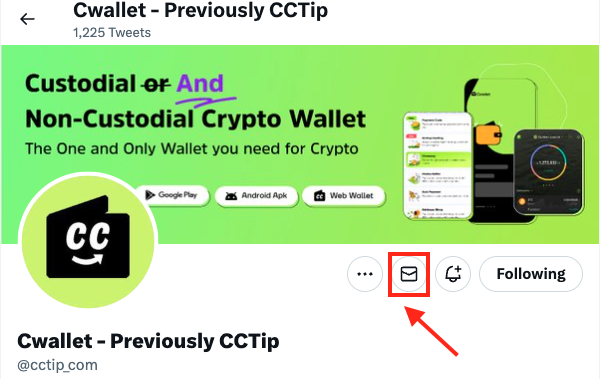
**3.** Go to the official Twitter account of Cwallet (**@cctip\_com**) and start a direct message.
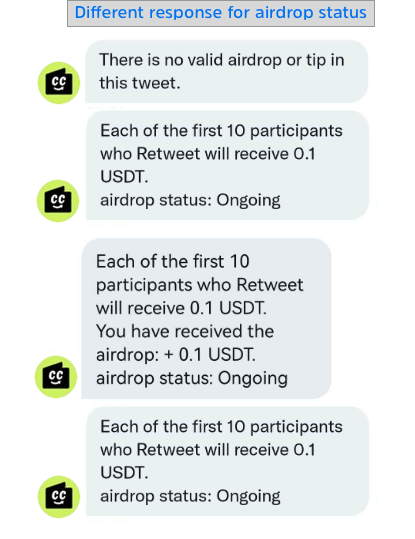
**4.** Paste the link in the direct message. The Cwallet bot will response with the airdrop status.
* ### **For an airdrop creator**
The bot will response with the rule of this airdrop and the airdrop status:
Ongoing or Ended
* ### **For an airdrop participant**
* **Received an airdrop successfully:** The bot will response with the rule of this airdrop, the airdrop status, and your collection details.
* **Not received it yet:** The bot will response with the rule of this airdrop and the airdrop status: Ongoing or Ended
* ### For an invalid airdrop:
This bot will inform you that there is no valid airdrop in this tweet.